Showing posts with label django. Show all posts

Thursday, August 22, 2019

Django - Field 'name' doesn't have a default value


When running django migration you run into following error - 

> python manage.py migrate

.........
  File "/usr/local/lib/python2.7/site-packages/MySQLdb/cursors.py", line 205, in execute

    self.errorhandler(self, exc, value)
  File "/usr/local/lib/python2.7/site-packages/MySQLdb/connections.py", line 36, in defaulterrorhandler
    raise errorclass, errorvalue

django.db.utils.OperationalError: (1364, "Field 'name' doesn't have a default value")


It's due to django_content_type table, where name column property is not allowing to get the migration run completing successfully as the column constraint is causing the failure.

Running following sql command would solve the issue -


ALTER TABLE django_content_type MODIFY COLUMN name character varying(50) NOT NULL DEFAULT 'not null';

Saturday, April 15, 2017

Generic relations in Django

While using django's content management system (admin), for adding different objects on it, you may want things like audit notes, that can be used for reference in the future or get some more info. you have two choice -


  1. Add a explicit field to the object, though the down side is you will need to add that extra field with all the objects where you want note.
  2. Create a generic model which can be used with different objects in your app. 

It's no brainer between above two choice, answer is 2nd. Generic relations are at help.

You can checkout django-contrib-comments, it's one of the example of generic relations. Let's take example of how Notes like foreign key reference can be added freely to any model in your app.

notes/models.py
from django.contrib.contenttypes.fields import GenericForeignKey
from django.contrib.contenttypes.models import ContentType

class Note(models.Model):
    note = models.TextField("note",
                            max_length=2000)
    date = models.DateTimeField(auto_now_add=True)
    # Below the mandatory fields for generic relation
    content_type = models.ForeignKey(
        ContentType, on_delete=models.CASCADE)
    object_id = models.PositiveIntegerField()
    content_object = GenericForeignKey('content_type', 'object_id')

    class Meta:
        verbose_name = 'Staff Note'

    def __unicode__(self):
        return self.date.strftime("%B %d, %Y")


Now, this Notes object can be referenced with any other model you want to use it with. Here is one example -

mymodel/models.py
from django.contrib.contenttypes.fields import GenericRelation
from notes.models import Note


class MyModel(models.Model):
    name = models.CharField("Name", max_length=100)
    notes = GenericRelation(Note)

When you run migration, it doesn't add anything in MyModel, as its generic relation it gets its references via django content type and object id.

How to add it in admin?

notes/admin.py
from django.contrib.contenttypes.admin import GenericTabularInline
from .models import Note

class NoteInline(GenericTabularInline):
    model = Note
    extra = 0


mymodel/admin.py
from misc.admin import NoteInline
from .models import MyModel

class MyModelAdmin(admin.ModelAdmin):
    inlines = [NoteInline, ]

admin.site.register(MyModel, MyModelAdmin)

And you are all set. It's easy to plug, efficient, and clean implementation. Good luck!

Django rest framework serializer with self-referential foreign key for comments

Django had default comments package sometime back (django.contrib.comments), since it's deprecated, there is external repo available for now.  It provides flat comments, so if you want threaded comments, you can use django-threadedcomments.

We are using django-rest-framework, and access the threaded comments via drf.

resources.py

class ObjectSerializer(serializers.ModelSerializer):

    comments = CommentsSerilizer(
        source='comments_set',
        many=True)

    class Meta:
        model = ObjectName
        fields = (
            "id",
            .....,
            "comments",
        )


serializers.py

from rest_framework import serializers
from .models import FluentComment

class RecursiveField(serializers.Serializer):
    def to_representation(self, value):
        serializer = self.parent.parent.__class__(
            value,
            context=self.context)
        return serializer.data

class CommentsSerilizer(serializers.ModelSerializer):
    children = RecursiveField(many=True)

    class Meta:
        model = FluentComment
        fields = (
            'comment',
            'url',
            'submit_date',
            'id',
            'children',
        )

Recursive Field is one way to get the self-referential objects via serializer, it handles parent-child relationship. Here is another way to do it -


class CommentsSerilizer(serializers.ModelSerializer):
    user = UserLightSerializer()

    class Meta:
        model = FluentComment
        fields = (
            'user',
            'comment',
            'submit_date',
            'id',
            'children',
        )

CommentsSerilizer._declared_fields[
     'children'] = CommentsSerilizer(many=True)


Above both options are fine, and it should do the magic. Good luck!

Tuesday, June 21, 2016

Django 1.7, 1.8 - queryset.extra is deprecated, how to do group by on datetime with date

In Django 1.5/1.6 version -

signup_count = list(User.objects.filter(
            profile__user_type='learner').order_by(
                '-id').extra({
                             'date_only': "date(date_joined)"}).values(
                                 'date_only').annotate(
                                     signup_count=Count('id'))[:40])

It used to return list with
[{ 'date_only': , 'signup_count': }]

Now, as the extra is deprecated in newer version of Django, here the work around to get the same -

from django.db.models.expressions import Func

# Create custom sql function
class ExtractDateFunction(Func):

    function = "DATE"

signup_signup = list(User.objects.filter(
            profile__user_type='learner').order_by('-id')annotate(
date_only=ExtractDateFunction("date_joined")).values(
'date_only').annotate(
teacher_count=Count('id'))[:40])

This should give you the same results as before. 

Monday, June 6, 2016

There is no South database module 'south.db.mysql' for your database - Django


Django 1.8+

Recently I come across this error, while running my Django application 
python manage.py runserver

There is no South database module 'south.db.mysql' for your database. Please either choose a supported database, check for SOUTH_DATABASE_ADAPTER[S] settings, or remove South from INSTALLED_APPS.

To fix it, you would try to lookup for south.db.mysql or try to search if you SOUTH_DATABASE_ADAPTERS. But you won't find it in your solution. To fix it you have two choices -

1. Manually downgrade to lower Django version i.e.1.6 or so. 
pip install Django==1.6.10

2. Uninstall South from your environment (virtual environment) and move to built-in migration process. 
pip uninstall south


Good luck!

Saturday, January 16, 2016

Search in Django with Haystack using Solr or Elastic Search

Lets say you want to provide search on your Django application. In specific model, or file search on your media files or data files uploaded by users.

Here are tech solution for it -

HayStack - Modular search for Django
It allows querying on top of any search engine from following - Solr, ElasticSearch, Xapian, Whoosh.

Solr and ElasticSearch is built on top of powerful search server Apache Lucene. Both are free, and under Apache License 2.

Interesting presentation on Solr vs ElasticSearch

ElasticSearch is distributed, some functions in Solr doesn't not allow distributed execution. Easy cloud support with third party. easy to scale, add/remove nodes. ES is realtime and distributed.

Solr and ElasticSearch both provides admin page, in ES its called ElasticSearch-Head. ES also provides concept of GateWay, which allows index recovering if the system crash in any case.

Use ES if - index is big and real time, several indices, multi tenancy requirement, want to save administrative effort and cost.
Don’t use ES if - your company is relatively new, and already using Solr, or no real-time search indexing required,  relatively small indices

Utility other than ElasticSearch-Head, is ElasticSearch-bigdesk which provides analytics and charts.

Solr There are some concern when real time index updates and search queries been performed. For plain vanilla search Solr out performs and works much better than ES.

You can find more comparison here.

Solr is older than ElasticSearch, so it got bigger community and help available online. At the same time ElasticSearch was built in order to overcome the scaling limitation of Solr. ES is stable, though Solr is more mature.In terms of scalability, ElasticSearch is easy to scale compare to Solr, but with Solr 4.0 that limitation will be gone as per the documentation.

Sematext provides support for both Solr and ElasticSearch, you can find good overview and comparisons on various categories in this series of blog post by them.

and now the competition is joined by Amazon CloudSearch, applications which use AWS for hosting also seems widely using CloudSearch. Here is comparison between CloudSearch and Solr. There is no clear winner! Make choice based on requirement of your environment. Try to keep it simple, unless its really required.

Wednesday, January 13, 2016

Python 32bit or 64bit ?

Recently I moved my application from centOS 5 to centOS 7, which had 64bit python installed. It end up crashing my django application because some of the packages I was using were compiled in 32bit python and they weren't compatible.

First thing you need to check whether the python you are running is 32 bit or 64 bit. Here is the simple command to check it -

$ python
Python 2.7.5 (default, Nov 20 2015, 02:00:19) 
[GCC 4.8.5 20150623 (Red Hat 4.8.5-4)] on linux2
Type "help", "copyright", "credits" or "license" for more information.
>>> import struct
>>> print struct.calcsize("P") * 8
64

That means its 64bit!

Tuesday, June 17, 2014

Setup New Relic with Webfaction Django App (Python setup)


New Relic is awesome Application Performance management tool. You can setup your application's health check in few easy steps -

Create a free account with New Relic. Here, below are the steps to setup your app's performance management on New Relic Dashboard :

- Get the licence key from newrelic


- install package on your server - pip install newrelic


- generate config file - newrelic-admin generate-config newrelic.ini
(It should generate newrelic.ini file)


- Add following lines in to .wsgi file (provide the full path of the newrelic.ini)
import newrelic.agent
newrelic.agent.initialize('/path/newrelic.ini')

- Restart the application

Within few minutes the you should be able to see the dashboard with different metrics. Also setup the web url of your application for the ping checker. In case of any issue with it, you will get real time notification. 


There are other tools like DataDog also used by so many companies. Both allows setup of different hosts and apps health check setup. I am also planning to setup celery and solr in new relic dashboard. I'll add setup steps for those as and when its done.

Tuesday, March 18, 2014

Use bitly python to shorten the url

We are using bitly to provide short url to users, which is little easy to look at visually and also (probably) motivate user to share instead of long long urls.  You might have seen those on while trying to tweet the link or share it on Facebook.

We are using Django for our web app, and getting short url from bitly while sending certain links in the email to user and provide it on the app to enable sharing.

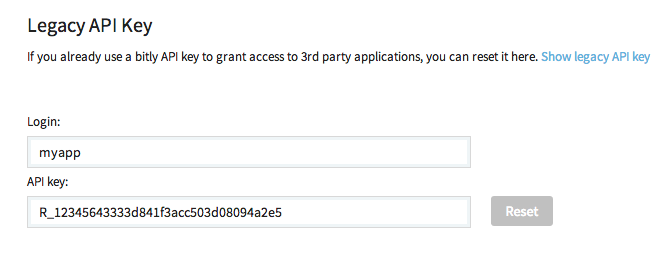
- Get your code from bitly account, you can get it from settings > Advanced > Legacy API Key


- Install bitly-python-api - Its official api provided by bitly for python.

- Now in following quick steps you can get the short URL:

import bitly_api
con = bitly_api.Connection(
                    'myapp',
                    'R_12345....'
                )
shorten = con.shorten('https://myapp.com/abc/?item=55678')
shorten_url = shorten['url']
//output - https://bit.ly/xyz123

bitly_api takes care of underlying connection complexity, if you using any other platform you can find related packages and instruction over here - http://dev.bitly.com/code_libraries.html


Monday, March 10, 2014

Update Django on Webfaction

We are using webfaction for our Django Application, and its been really awesome service for the Django apps. Most of the things are configurable from their support dashboard.

Now you get to choose the Django and python version when you setup your application first time. However, later if you want to upgrade to newer version of the Django as it made available by Django community, you can follow below steps. In this example my current version of Django is 1.4.1 and I am going for Django 1.4.5.

Please note, following steps are just to update the Django version, if there are functional, API, Model query, settings or any other changes required inside your application, you will need to refer to Django official documentation or migration guide provided on the Django.

Here are the steps to upgrade Django in Webfaction -

1. Go to your App directory. 
> $HOME/webapps/

2. Get the version you want. (here we are extracting 1.4.5)
> wget https://www.djangoproject.com/download/1.4.5/tarball/

3. Extract.
> tar -zxvf Django-1.4.5.tar.gz

4. Rename the existing one. (existing django to django.old)
> mv lib/python2.7/django lib/python2.7/django.old

5. move the new one to lib (now as we have renamed, we can move the content from new django package to lib/python 2.7)
> cp -R Django-1.4.5/django lib/python2.7

6. move the management scripts (copy management script for wsgi, and app creation etc.)
> cp Django-1.4.5/django/bin/* bin
7. Restart and make sure it runs fine.
> apache2/bin/restart

8. delete the extract and tar (only after checking that it works fine, you can remove the floating folder and file from the directory.)
> rm -rf Django-1.4.5*

And that should do the trick! Feel free to drop message or email if you run into any issue.

Thanks.

Saturday, October 19, 2013

Site matching query does not exist. Lookup parameters were {'pk': 1}

Django 1.5.1

I created sample app and run the syncdb (python manage.py syncdb) and it created default tables for the application. It didn't created the tables for the app's model. For that I had to run -

python manage.py syncdb --all

It took care of the other tables creation.

Though while accessing the app I run into following error -

Traceback (most recent call last):
  File "/Users/Jaimin/Apps/Github/kqotes/quote/lib/python2.7/site-packages/django/core/handlers/base.py", line 187, in get_response
    response = middleware_method(request, response)
  File "/Users/Jaimin/Apps/Github/kqotes/quote/lib/python2.7/site-packages/django/contrib/redirects/middleware.py", line 23, in process_response
..................
  File "/Users/Jaimin/Apps/Github/kqotes/quote/lib/python2.7/site-packages/django/db/models/query.py", line 389, in get
    (self.model._meta.object_name, kwargs))
DoesNotExist: Site matching query does not exist. Lookup parameters were {'pk': 1}
Internal Server Error: /api-auth/login/

Tried different things, though couldn't figure anything.

Solution - After deleting the schema, I run python manage.py syncdb --all

bingo! All worked fine, and magically error is gone.

The issue was first time it didn't created entry for the app in site table (Its part of default tables when you do syncdb.)

select * from django_site

You can add manual entry, or drop the schema and run it again. That will assign the primary key object and app will come up fine.

Any other comments, observation, feel free to drop in comment.

Thursday, September 12, 2013

iter() returned non-iterator of type '_timelex'

If you running into issue -  iter() returned non-iterator of type '_timelex', here is the solution -

You got python-dateutil 2.0 with python 2.7 which is not compatible. What you need is, install older version of python-dateutil, so downgrade to python-dateutil==1.5


In order to downgrade the version you can get details over here.

Django - generate list of individual item from queryset result


How to get particular value from Django queryset result set -

Lets say you only one field 'question_id' from Paper object -

> Paper.objects.values('question_id')
>[{'question_id': 311L}, {'question_id': 310L}, {'question_id': 291L}, {'question_id': 302L}, {'question_id': 301L}, {'question_id': 300L}, {'question_id': 299L}, {'question_id': 298L}, {'question_id': 294L}, {'question_id': 293L}, {'question_id': 282L}, {'question_id': 281L}, {'question_id': 235L}, {'question_id': 234L}, {'question_id': 233L}, {'question_id': 47L}, {'question_id': 276L}, {'question_id': 48L}]

Now if you want to make list of this question_ids, one way is to loop thru the list of dict and fetch the value, but easy way is following -

>Paper.objects.values_list('question_id', flat=True)
>[311L, 310L, 291L, 302L, 301L, 300L, 299L, 298L, 294L, 293L, 282L, 281L, 235L, 234L, 233L, 47L, 276L, 48L]

Thursday, July 25, 2013

Django inline extend from different pages based on condition

Its been sometime I have posted anything on this blog. Recently I came across nice inline syntax if you need to extend the pages based on certain condition. e.g. I have container master page which i want to choose differently if user is logged in or not -

{% extends user.is_authenticated|yesno:"my_home.html,base_home.html" %}

It checks if person is authenticated or not, if authenticated it will extend my_home.html otherwise it will extend base_home.html


Thursday, May 2, 2013

Downgrade the pip installed package


While installing something on my local for my application I run into problem where it replaced (overwrote) one the of the package which wasn’t compatible with other applications I was using. So basically I was dependent on two applications which were dependent on another third party application but not of the same version.

Of coures, I was not ready for that upgrade, so I had to downgrade the version manually for that package, I am sure people run into similar problem often. 

Here are the steps I followed -

In this case Django 1.5 was installed, so it removed my existing Django 1.4.5 and installed 1.5

To downgrade and again go back to Dajngo 1.4.5, you need to locate the egg file for Django which normally you can find it in your vritual env path -

//lib/python2.7/site-packages/Django-1.5.1-py2.7.egg-info

Delete this file, and install 1.4.5 manually with following command -

pip install django==1.4.5

You can follow the same instruction for any other package.

Wednesday, February 27, 2013

Django admin staff authentication on your webapp views


Lets say you have certain views you want to control the access and should be only accessible by staff members.

Its two lines of code change and you are done. 

from django.contrib.admin.views.decorators import staff_member_required

in your module’s views.py

@staff_member_required
def staffdashboard(request):
            ….
            ….
            return render_to_response(‘dashboard.html',context_instance=RequestContext(request))

When user tries to access the view, it will check if user is authorized staff member. If not it will prompt for admin login screen.

Sunday, November 4, 2012

Null Check in different language


Python - Null Check

15 or "default"       # returns 15
0 or "default"         # returns "default"
None or "default"    # returns "default"
False or "default"    # returns "default"

Django Template - None Check


{{obj.item_value|default_if_none:"smile"}}

C# - Null Check

var data = val ?? "default value";

Java - Null check

Foo f = new Foo();
DummyObj obj = new Obj().getSelection();
String str = obj != null ? f.format(obj) : "";

Javscript - Null/Undefined check

if (! param) param = "abc";
//other way to check this
if (param == null) is same as if(!param)


jQuery - Null/existence check

if ( $('#myDivObj').length ) {}

Feel free to add comments and other languages Null check mechanism (inline or explicit) 

Friday, October 5, 2012

Know your environment: checkout versions

Often we run into situation to check what version we are running for particular framework, language, module.

Here, I have tried to list down the one I come across during my work -

Go to Python shell and follow below instruction for individual.

Django


>>> import django
>>> print django.VERSION
(1, 3, 1, 'final', 0)

Python


>>> import sys
>>> print sys.version
2.7.1 (r271:86832, Jul 31 2011, 19:30:53) 
[GCC 4.2.1 (Based on Apple Inc. build 5658) (LLVM build 2335.15.00)]

NLTK


>>> import nltk
>>> nltk.__version__
'2.0.1rc4'

dateutil

>>> import dateutil
>>> dateutil.__version__
'1.5'

- Important thing to note here is python-dateutil 2.0 is not compatible with python 2.7 it only works with python 3.0. For 2.7 please try 1.5

-If you have 2.0, first uninstall and then install specific one


$ pip uninstall python-dateutil


$ pip install python-dateutil==1.5

Saturday, September 1, 2012

django JSON with DateTime


Django json.dump(data) throws error ‘datetime (...) is not JSON serialzable.’ because default it only does queryset json serialization. Use below to serialize dates.


from django.core.serializers.json import DjangoJSONEncoder


def test(request, title):
    …
    data =  json.dumps(qset, cls=
DjangoJSONEncoder)

Which is similar to extending the default JSONEncoder and check for the datetime and return it with extra code to handle it.

This should resolve the issue.